4. Konto og synkronisering¶
4.1 Dit brugernavn¶
Åbn menuen, og tryk på din identitetsblok øverst (den viser "Ikke logget ind · Log ind", mens du er logget ud) for at nå siden "Bruger". Dit viste navn sidder øverst på den, under en cirkel med dit forbogstav — det er også dit skyttenavn på resultatkortene og på challenge-ranglisterne. Så længe du stadig bærer standardnavnet, inviterer en guldchip "Vælg dit navn" dig til at vælge et.
Når du er logget ind, trykker du på blyanten ved siden af navnet for at redigere det på stedet (feltet "Navn", med teksten "Synligt for andre skytter og på ranglisterne"); navnet gemmes, når du forlader feltet, og et tomt felt beholder det hidtidige navn. Uden konto kan navnet ikke redigeres — det fastsættes, når du logger ind.
4.2 Brug af appen uden konto¶
Appen kan bruges fuldt ud uden at logge ind. Ved første start opretter den en privat enhedsprofil: sessioner, serier, skud og indstillinger registreres under den profil og synkroniseres til skyen som sikkerhed, men de er knyttet til denne enhedsinstallation.
Du får brug for en Fastmark-konto, når du har brug for noget af følgende:
- de samme data på flere enheder (telefon + tablet eller en ny telefon);
- at følge en serie direkte fra en anden enhed (§4.5);
- deling af begivenheder med andre kontohavere;
- challenges (kapitel 12) — ranglisterne bærer dit brugernavn, så de kræver en konto;
- supervisortilstand (kapitel 9) — supervisoradgang gives til en konto og kræver derfor en.
4.3 Login¶
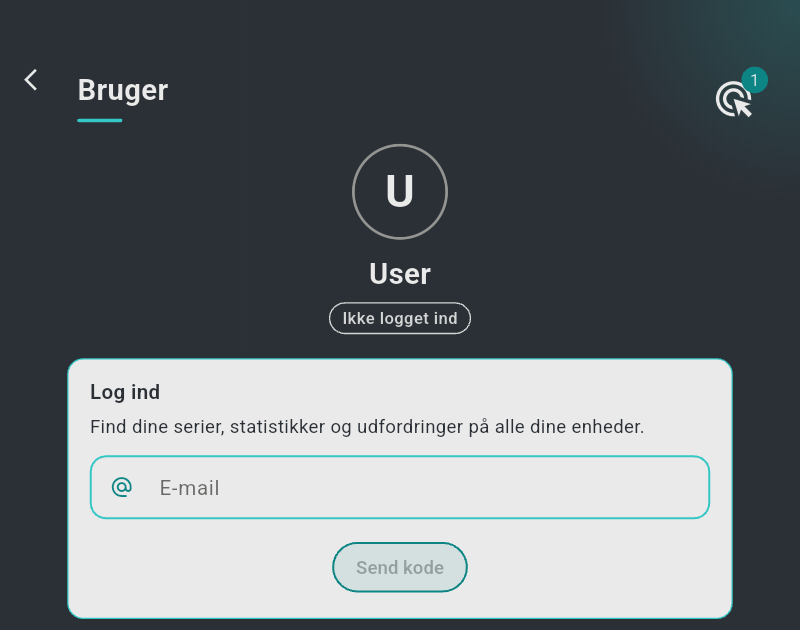
Login sker med en engangskode pr. e-mail — der findes ingen adgangskode.
- På siden Bruger (§4.1) rummer kortet "Log ind" ("Find dine serier, statistikker og udfordringer på alle dine enheder.") et felt "E-mail": indtast din adresse, og tryk på "Send kode" (kræver internet — offline er knappen deaktiveret, og kortet viser "Kræver internetadgang; afbryd forbindelsen til skivens netværk om nødvendigt").
- Kortet viser nu "Indtast koden, du har modtaget på e-mail": tjek din indbakke, og indtast den 6-cifrede kode i kodefelterne. Knappen "Send koden igen" sender den igen efter en karenstid på 60 sekunder (den tæller ned som "Send koden igen (59 s)").
- Kortet viser "Kontrollerer koden…" og derefter "Login lykkedes" — eller "Forkert kode", og i så fald indtaster du koden igen.
- Ved succes dækker en fuldskærmsdialog — "Henter dine data…", med en fremdriftsbjælke, dens procent og linjen "Dine serier og indstillinger hentes til denne enhed." — skiftet til kontoens data. Den kan ikke lukkes manuelt og lukker af sig selv, når downloaden er færdig; startskærmen viser derefter kontoens historik.
Konti, der er logget ind, får også et kort "Skyttevalg" på Bruger-siden med knappen "Vis min kode" — delekoden, der lader en anden konto tilføje dig som skytte i sine sessioner (§9.3).
Nederst på siden sender "Log ud" appen tilbage til enhedsprofilen (den samme downloaddialog kører, mens enhedsprofilens data gendannes). Begge knapper kræver internet.
4.4 Sletning af din konto¶
"Slet konto" nederst på Bruger-siden (kræver internet) sletter din konto med det samme — der er intet bekræftelsestrin — og appen vender tilbage til enhedsprofilen; knappen viser derefter "Kontoen er slettet". Logger du senere ind med den samme e-mailadresse, starter du med en frisk, tom konto — den slettede kontos data kan ikke gendannes.
4.5 Flere enheder — master og seere¶
Når en serie kører, har præcis én enhed styringen:
- Den enhed, der starter en serie, er dens master: den styrer skiverne, modtager skuddene, beregner scorerne og ejer stop/næste/gentag-knapperne.
- Alle andre enheder, der er logget ind på samme konto (eller abonnerer på samme begivenhed), viser serien direkte, skrivebeskyttet: skud og scorer vises, efterhånden som de synkroniseres. Seer-enheder beholder deres tilbage-pil og har ingen handlingsknap.
Automatisk åbning: når en serie starter i en session, du kan se — startet fra en anden af dine enheder eller af ejeren af en begivenhed, du abonnerer på — springer appen af sig selv til den direkte serieskærm. Det sker højst én gang pr. session: lukker du den direkte visning, åbner den ikke igen for samme session. (I passiv tilstand filtreres dette til en enkelt skive — se §9.6.)
4.6 Offline først — sådan opfører synkroniseringen sig¶
- Alt fungerer offline: oprettelse af sessioner, skydning, pointgivning, rettelser, noter. Alle data skrives øjeblikkeligt til enheden.
- Så snart en forbindelse er tilgængelig, uploades ændringer i baggrunden, og andre enheder modtager dem. Ingen brugerhandling er nogensinde nødvendig; der findes ingen synkroniseringsknap og ingen "ikke gemt"-tilstand.
- Internet kræves kun til: den allerførste start, login og logout, sletning af kontoen samt modtagelse af data fra andre enheder.
4.7 Supervisoradgang på din konto¶
Supervisoradgang — retten til at styre flere skytter og flere skiver fra én enhed — gives af Fastmark på din konto sammen med listen over dine registrerede skiver (kun Club 55). Gruppen "Supervisortilstand" på Bruger-siden viser den aktuelle status:
- "Gyldig til
" , mens adgangen er aktiv, eller "Intet aktivt abonnement" uden; - med adgang en udvidelig liste "Registrerede skiver:
" — én kontakt pr. registreret skiveserienummer, som bruges af passiv tilstand (§9.6).
Kontakt Fastmark for at få eller forlænge supervisoradgang. Kapitel 9 beskriver, hvad den låser op for.