6. Running a series¶
6.1 The live shooting screen¶
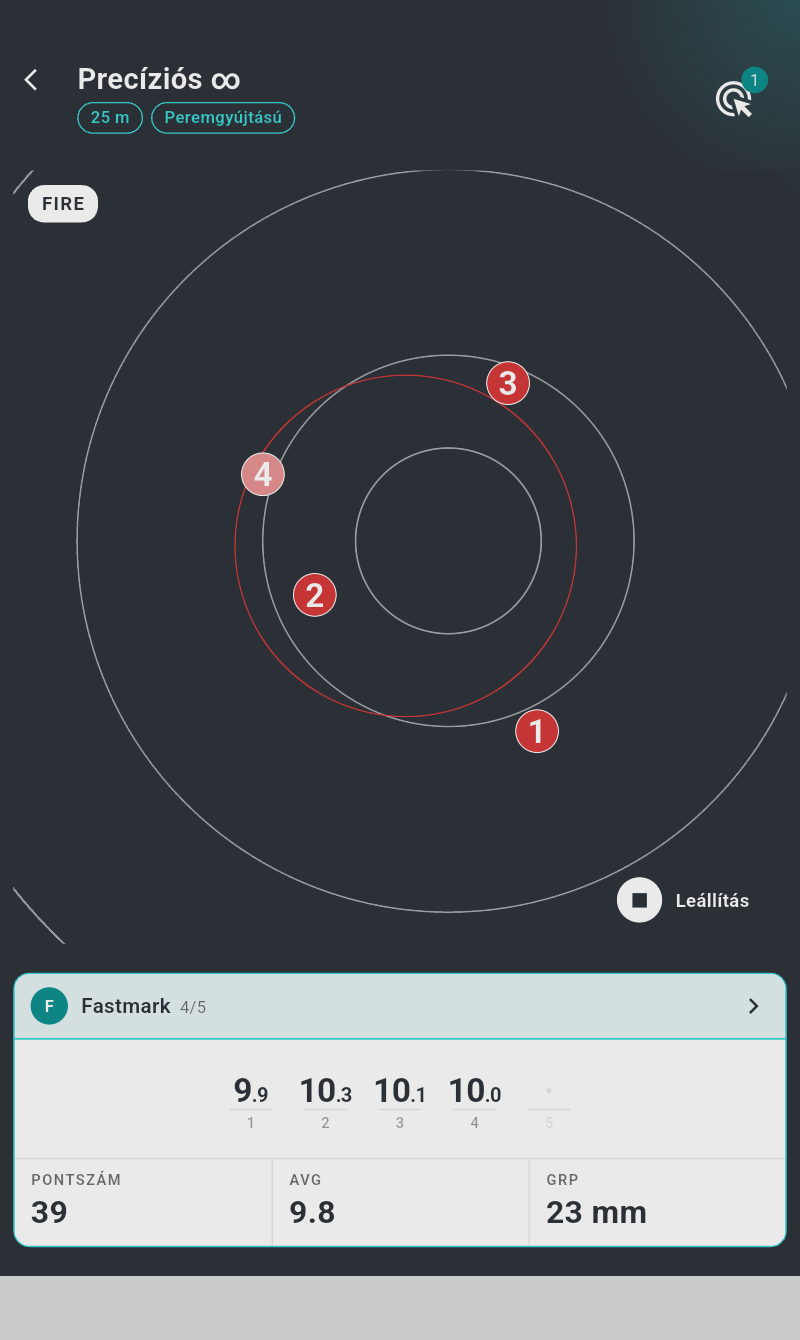
- Title bar — the series format: Precision followed by its time (1mn, 5mn, 150s, or ∞ for unlimited), or Rapid fire followed by its exposure/interval seconds (Rapid fire 3/7), with the organisation badge (ISSF, TAR) for official formats. The subtitle line reads "Sighting series", "Series no. {}/{}" within a match, or "Malfunctions" for a re-shoot series, followed by chips for the distance, the caliber and "Reduced" where applicable. The target button sits at the right (§3.1).
- The target panel — a white panel holding the target face; every shot appears on it as it lands (§6.4).
- Phase display (top left of the panel) — a ring draining with the seconds remaining in the current phase, next to a chip with the current range command in capitals: "Load", "Attention", "Fire" or "Stop". The ring is hidden while more than 5 minutes remain and in unlimited phases; once the series is over the chip reads "Finished".
- The action button (bottom right of the panel) — a labelled pill: "Stop", "Force stop", "Next", "Reshoot" or "Replay" depending on state (§6.6).
- The result card of the shooter being displayed, with live scores (§7.5). With several shooters, the session owner also gets an "Overview" button ("{} shooters") above the card (§7.5).
In portrait the target panel sits above the result card; in landscape they are side by side.
While a series is running on this device:
- the screen stays awake — no need to touch it to keep it on;
- leaving the page stops the series: the back arrow (and the system back gesture) opens a "Stop series" confirmation — "Leaving this page stops the series in progress. Do you confirm?". "Stop series" stops the series at once and leaves; "Keep going" keeps it running. If a target cannot be stopped, the page stays open with "Some targets could not be stopped — retry" — go back again to retry. (On a viewing device, and once the series is finished, the back arrow works normally.)
6.2 The phases of a series¶
A series is a fixed sequence of phases. Each phase sets the target's light, shows its command on screen, and (with the sound options on) plays a beep and a spoken command.
Precision series (a Series time or a free series):
| Phase | Command | Target LED | Beep | Spoken |
|---|---|---|---|---|
| Preparation (optional) | "Load" | off by default (red if enabled) | — | "Load" |
| Waiting (optional) | "Attention" | red | low beep | "Attention" |
| Shooting | "Fire" | green | high beep | — |
| Closing (2 s) | "Stop" | red | low beep | "Stop" |
The shooting phase accepts up to the series' shot count per shooter and lasts Series time — or, in a free series, until every shooter has fired all shots, at which point the series ends by itself.
Rapid-fire series (a Valid time is set): after the optional preparation, the attention/shooting pair repeats once per shot:
| Phase (× shots) | Command | Target LED | Beep |
|---|---|---|---|
| Interval (Waiting time) | "Attention" | red | low beep |
| Exposure (Valid time) | "Fire" | green | high beep |
In rapid fire the first "Attention" (before the first exposure) is spoken; the repeated "Attention" before each later exposure is marked by its beep only — it is not spoken, even with the spoken commands enabled.
…followed by the same 2-second closing phase. Only the first shot of each exposure counts; anything extra is recorded but not scored (§7.3).
ISSF-compliant series (from the official templates) additionally apply the ISSF timing tolerances: the green light stays on 0.1 s beyond the nominal end of each shooting phase, and a shot fired within 0.2 s after the light turns red still counts — up to 0.3 s past the nominal time, exactly as on electronic ranges in competition.
6.3 Sounds and spoken commands¶
Three switches in Settings → Sound control the audio (all off by default):
- "Play beeps" — a high beep marks the start of every shooting phase, a low beep every attention and stop transition.
- "Play commands" — the range commands "Load", "Attention" and "Stop" are spoken (in the app's language — §10.1). The start of shooting is signalled by the high beep and the green light, not by voice — as on a real range.
- "Play scores" — each shot's score is announced as it lands.
Sounds play on the device showing the series.
6.4 Shots on the target face¶
- Each impact appears within a fraction of a second, numbered in shooting order. The most recent valid hit pulses. Zoomed in, holes are drawn at their true bullet-diameter scale; at lower zoom they are enlarged just enough to stay visible.
- Shots that do not count — fired outside a shooting phase, extra shots in an exposure, impacts in a practice column, or discarded readings — are drawn as red crosses and excluded from the score (§7.3).
- Pinch to zoom (up to 10×), drag to pan, double-tap to zoom in (4×) on a spot, double-tap again to fit. With "Auto zoom" on (the default), the view reframes on the shot group after each hit (up to 6×; on the Benchrest faces it snaps to the aiming point hit).
- When enabled in settings, the mean-radius circle and the maximal-spread frame are drawn over the group in red (§7.7).
6.5 Skipping the preparation time¶
During the preparation ("Load") phase, tap the countdown ring to skip ahead: the phase is cut down so that only your configured "Preparation time" remains — adjustable in Settings → Session (default 20 s). The tap does nothing if less than 5 seconds would be gained. Handy when the official format prescribes minutes of preparation you don't need in practice.
6.6 Ending a series — the action button¶
The labelled button at the bottom right of the target panel changes with the state of the series. It is shown only on the master device, to the session owner:
| State | Button | Effect |
|---|---|---|
| Series running | "Stop" | Ends the series cleanly, without confirmation: the sequence jumps to its end, unfired shots become misses, targets are released |
| Sequence over, a target still closing | "Force stop" (with a spinner ring) | Force-stops targets that have not confirmed the end |
| Finished — only series of its session | "Replay" | Creates a fresh copy of the session and starts it in place |
| Finished — malfunctions declared | "Reshoot" | Creates and starts the malfunction re-shoot series (§7.9) |
| Finished — next series in the match | "Next" | Starts the next series of the session (grey until its targets are assigned) |
With "Auto next" enabled (Settings → Interface), the next series of a match starts 3 seconds after the current one closes — the button shows a progress ring while the timer runs; tap it to skip the wait.
When a series finishes, the back arrow no longer asks for confirmation: leave the screen to the session page or home, or dive into the result card (chapter 7).
6.7 Interruptions — what recovers by itself¶
The system is built to recover by itself: as long as a target stays powered, no shot it recorded is ever lost. In all of the following situations, there is nothing to repair:
| If this happens | What to do |
|---|---|
| The connection drops (distance, interference) | Nothing — the app reconnects within seconds and catches up on any shots fired in the gap |
| The app is closed or the phone reboots mid-series | Just reopen the app — the series comes back live, with the shots fired in between |
| Bluetooth is switched off and back on | Nothing — the targets reconnect by themselves |
| A target switches off mid-series (switch, empty battery, overheating) | That target leaves the series at once (a target that falls silent is dropped after 15 s) and the others keep shooting; the series stops once no target is left |
| The series won't start | A panel titled "The series did not start" ("Series couldn't be launched on all targets") offers "Retry", and "Delete the session" when the session was just created (otherwise "Cancel", which leaves the unstarted series open) — nothing has started, nothing is lost |
If anything ever fails to recover along these lines, see chapter 11.