6. Przebieg serii¶
6.1 Ekran strzelania na żywo¶
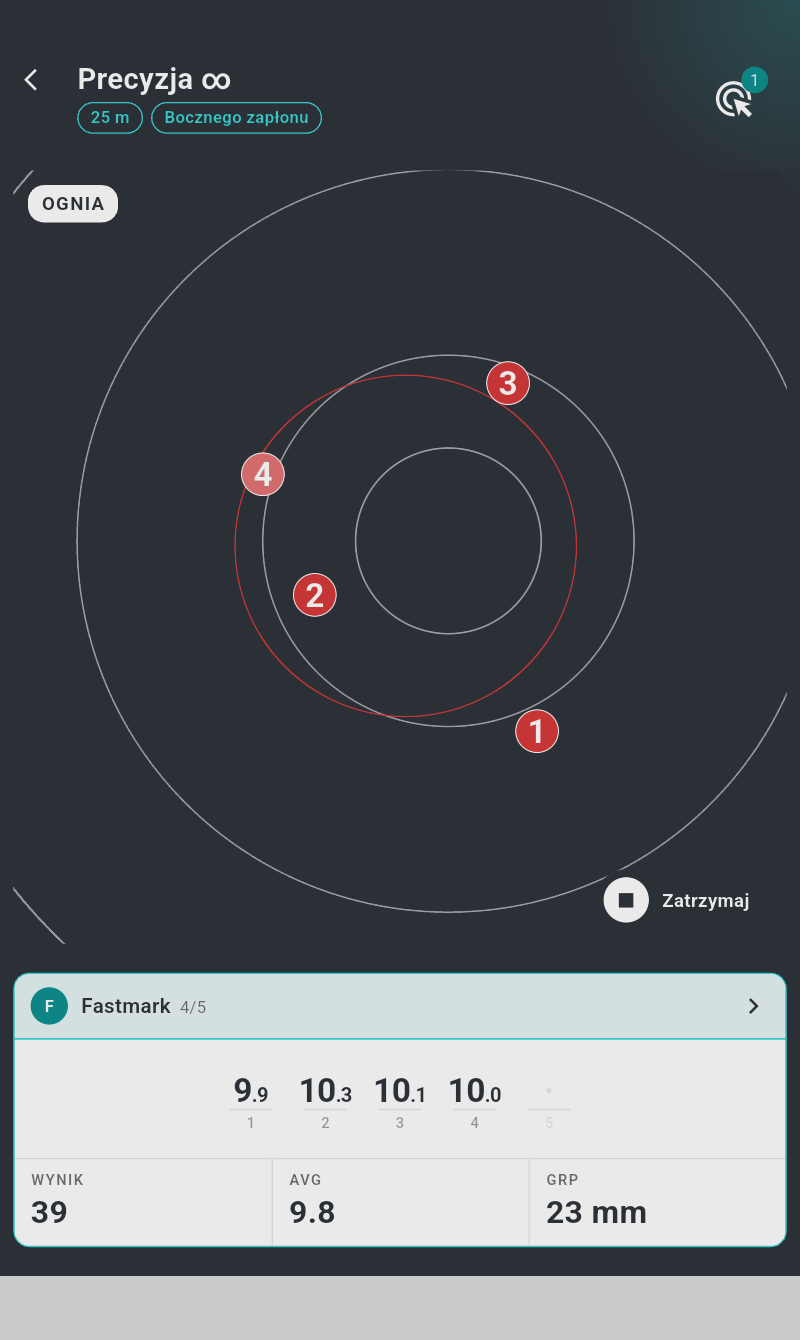
- Pasek tytułowy — format serii: Precyzja z jej czasem (1mn, 5mn, 150s albo ∞ dla braku ograniczenia) albo Szybkostrzelny z sekundami ukazania/odstępu (Szybkostrzelny 3/7), z plakietką organizacji (ISSF, TAR) dla formatów oficjalnych. Wiersz podtytułu zawiera "Seria próbna", "Seria nr {}/{}" w ramach zawodów albo "Awarie" dla serii powtórkowej, a następnie znaczniki odległości, kalibru i "Zmniejszona", tam gdzie ma to zastosowanie. Po prawej znajduje się przycisk tarcz (§3.1).
- Panel tarczy — biały panel z obrazem tarczy; każdy strzał pojawia się na nim w chwili trafienia (§6.4).
- Wskaźnik fazy (u góry po lewej na panelu) — pierścień opróżniający się wraz z sekundami pozostałymi w bieżącej fazie, obok znacznika z bieżącą komendą strzelnicy wielkimi literami: "ŁADUJ", "UWAGA", "OGNIA" lub "STOP". Pierścień jest ukryty, gdy pozostaje więcej niż 5 minut, oraz w fazach bez ograniczenia czasu; po zakończeniu serii znacznik pokazuje "ZAKOŃCZONA".
- Przycisk akcji (na dole po prawej panelu) — podpisana pigułka: "Zatrzymaj", "Wymuś zatrzymanie", "Następna", "Strzelaj ponownie" lub "Powtórz", zależnie od stanu (§6.6).
- Karta wyników wyświetlanego zawodnika, z wynikami na żywo (§7.5). Przy kilku zawodnikach właściciel sesji dostaje też nad kartą przycisk "Przegląd" ("Strzelcy: {}") (§7.5).
W orientacji pionowej panel tarczy znajduje się nad kartą wyników; w poziomej są obok siebie.
Gdy seria trwa na tym urządzeniu:
- ekran pozostaje włączony — nie trzeba go dotykać, aby nie zgasł;
- opuszczenie strony zatrzymuje serię: strzałka wstecz (i systemowy gest wstecz) otwiera potwierdzenie "Zatrzymaj serię" — "Opuszczenie tej strony zatrzyma trwającą serię. Czy potwierdzasz?". "Zatrzymaj serię" zatrzymuje serię natychmiast i wychodzi; "Kontynuuj" pozostawia ją w toku. Jeżeli którejś tarczy nie udaje się zatrzymać, strona pozostaje otwarta z komunikatem "Nie udało się zatrzymać niektórych tarcz — spróbuj ponownie" — cofnij się ponownie, aby powtórzyć próbę. (Na urządzeniu-widzu oraz po zakończeniu serii strzałka wstecz działa normalnie.)
6.2 Fazy serii¶
Seria to ustalona sekwencja faz. Każda faza ustawia światło tarczy, pokazuje swoją komendę na ekranie i (przy włączonych opcjach dźwięku) odtwarza sygnał dźwiękowy oraz komendę głosową.
Seria precyzyjna (ustawiony Czas serii albo seria bez ograniczenia):
| Faza | Komenda | LED tarczy | Sygnał | Głos |
|---|---|---|---|---|
| Przygotowanie (opcjonalna) | "Ładuj" | domyślnie zgaszona (czerwona, jeśli włączono) | — | "Ładuj" |
| Oczekiwanie (opcjonalna) | "Uwaga" | czerwona | niski ton | "Uwaga" |
| Strzelanie | "Ognia" | zielona | wysoki ton | — |
| Zakończenie (2 s) | "Stop" | czerwona | niski ton | "Stop" |
Faza strzelania przyjmuje do liczby strzałów serii na zawodnika i trwa Czas serii — a w serii bez ograniczenia do chwili, gdy każdy zawodnik odda wszystkie strzały; wtedy seria kończy się sama.
Seria szybkostrzelna (ustawiony Czas na strzał): po opcjonalnym przygotowaniu para oczekiwanie/strzelanie powtarza się raz na strzał:
| Faza (× liczba strzałów) | Komenda | LED tarczy | Sygnał |
|---|---|---|---|
| Odstęp (Czas oczekiwania) | "Uwaga" | czerwona | niski ton |
| Ukazanie (Czas na strzał) | "Ognia" | zielona | wysoki ton |
W serii szybkostrzelnej pierwsza "Uwaga" (przed pierwszym ukazaniem) jest wypowiadana; powtarzana komenda "Uwaga" przed każdym kolejnym ukazaniem jest sygnalizowana wyłącznie tonem — nie jest wypowiadana, nawet przy włączonych komendach głosowych.
…po czym następuje ta sama 2-sekundowa faza zakończenia. Liczy się tylko pierwszy strzał każdego ukazania; wszystko ponadto jest rejestrowane, ale nie punktowane (§7.3).
Serie zgodne z ISSF (z oficjalnych szablonów) stosują dodatkowo tolerancje czasowe ISSF: zielone światło pozostaje włączone 0,1 s po nominalnym końcu każdej fazy strzelania, a strzał oddany w ciągu 0,2 s po zmianie światła na czerwone nadal się liczy — do 0,3 s po czasie nominalnym, dokładnie jak na strzelnicach elektronicznych podczas zawodów.
6.3 Dźwięki i komendy głosowe¶
Trzy przełączniki w Ustawienia → Dźwięk sterują dźwiękiem (wszystkie domyślnie wyłączone):
- "Sygnalizuj fazy dźwiękiem" — wysoki ton oznacza początek każdej fazy strzelania, niski ton — każde przejście do oczekiwania i stopu.
- "Zapowiadaj komendy" — komendy "Ładuj", "Uwaga" i "Stop" są wypowiadane (w języku aplikacji — §10.1). Początek strzelania sygnalizowany jest wysokim tonem i zielonym światłem, nie głosem — jak na prawdziwej strzelnicy.
- "Zapowiadaj wyniki" — wynik każdego strzału jest ogłaszany w chwili trafienia.
Dźwięki odtwarza urządzenie wyświetlające serię.
6.4 Strzały na obrazie tarczy¶
- Każde trafienie pojawia się w ułamku sekundy, ponumerowane w kolejności strzelania. Ostatnie ważne trafienie pulsuje. Po powiększeniu przestrzeliny są rysowane w swojej prawdziwej skali średnicy pocisku; przy małym powiększeniu są powiększane akurat na tyle, by pozostały widoczne.
- Strzały, które się nie liczą — oddane poza fazą strzelania, dodatkowe strzały w ukazaniu, trafienia w kolumnie treningowej albo odrzucone odczyty — są rysowane jako czerwone krzyżyki i wyłączane z wyniku (§7.3).
- Zsuń/rozsuń palce, aby powiększać (do 10×), przeciągnij, aby przesuwać, dotknij dwukrotnie, aby przybliżyć dane miejsce (4×), i ponownie dwukrotnie, aby dopasować widok. Przy włączonym "Automatyczne powiększenie" (ustawienie domyślne) widok po każdym trafieniu kadruje się na skupienie strzałów (do 6×; na tarczach Benchrest przeskakuje do trafionego punktu celowania).
- Po włączeniu w ustawieniach na skupieniu rysowane są na czerwono okrąg promienia średniego i ramka rozrzutu maksymalnego (§7.7).
6.5 Skracanie czasu przygotowania¶
Podczas fazy przygotowania ("Ładuj") dotknij pierścienia odliczania, aby przeskoczyć do przodu: faza zostaje skrócona tak, aby pozostał tylko skonfigurowany "Czas przygotowania" — do ustawienia w Ustawienia → Sesja (domyślnie 20 s). Dotknięcie nie działa, jeżeli zysk byłby mniejszy niż 5 sekund. Przydatne, gdy oficjalny format przewiduje minuty przygotowania, których nie potrzebujesz na treningu.
6.6 Kończenie serii — przycisk akcji¶
Podpisany przycisk na dole po prawej panelu tarczy zmienia się wraz ze stanem serii. Jest widoczny tylko na urządzeniu prowadzącym, dla właściciela sesji:
| Stan | Przycisk | Działanie |
|---|---|---|
| Seria trwa | "Zatrzymaj" | Kończy serię w sposób kontrolowany, bez potwierdzenia: sekwencja przeskakuje do końca, nieoddane strzały stają się pudłami, tarcze są zwalniane |
| Sekwencja zakończona, tarcza jeszcze się zamyka | "Wymuś zatrzymanie" (ze wskaźnikiem obrotowym) | Wymusza zatrzymanie tarcz, które nie potwierdziły zakończenia |
| Zakończona — jedyna seria swojej sesji | "Powtórz" | Tworzy świeżą kopię sesji i uruchamia ją na miejscu |
| Zakończona — zgłoszone awarie | "Strzelaj ponownie" | Tworzy i uruchamia serię powtórkową po awarii (§7.9) |
| Zakończona — następna seria zawodów | "Następna" | Uruchamia następną serię sesji (szary, dopóki jej tarcze nie zostaną przypisane) |
Przy włączonym "Automatyczna seria" (Ustawienia → Interfejs) następna seria zawodów rozpoczyna się 3 sekundy po zamknięciu bieżącej — przycisk pokazuje w tym czasie pierścień postępu; dotknij go, aby pominąć oczekiwanie.
Gdy seria się zakończy, strzałka wstecz nie prosi już o potwierdzenie: opuść ekran na stronę sesji albo ekran główny, albo przejdź do karty wyników (rozdział 7).
6.7 Przerwy — co odtwarza się samo¶
System jest zbudowany tak, aby odtwarzać się samodzielnie: dopóki tarcza pozostaje włączona, żaden zarejestrowany przez nią strzał nigdy nie ginie. W żadnej z poniższych sytuacji nie ma nic do naprawiania:
| Jeśli zdarzy się to | Co robić |
|---|---|
| Połączenie się zrywa (odległość, zakłócenia) | Nic — aplikacja łączy się ponownie w kilka sekund i nadrabia strzały oddane w przerwie |
| Aplikacja zostaje zamknięta albo telefon restartuje się w trakcie serii | Po prostu otwórz aplikację ponownie — seria wraca na żywo, wraz ze strzałami oddanymi w międzyczasie |
| Bluetooth zostaje wyłączony i włączony | Nic — tarcze łączą się ponownie same |
| Tarcza wyłącza się w trakcie serii (włącznik, rozładowany akumulator, przegrzanie) | Ta tarcza natychmiast opuszcza serię (tarcza, która zamilkła, jest odrzucana po 15 s), a pozostałe strzelają dalej; seria zatrzymuje się, gdy nie zostanie żadna tarcza |
| Seria nie chce się rozpocząć | Panel zatytułowany "Seria nie została uruchomiona" ("Nie udało się rozpocząć serii na wszystkich tarczach") oferuje "Ponów" oraz "Usuń sesję", gdy sesja została dopiero co utworzona (w przeciwnym razie "Anuluj", które pozostawia nierozpoczętą serię otwartą) — nic się nie zaczęło, nic nie ginie |
Jeżeli cokolwiek kiedykolwiek nie odtworzy się zgodnie z powyższym, patrz rozdział 11.