7. Scoring & results¶
7.1 The score of a shot¶
Every scored shot is worth 0 to 10.9 points. The target face's rings carry the classic values (10 at the center outward to the lowest ring); each ring is divided into ten decimal steps, so a deep central ten is a 10.9. Shot scores are always displayed with one decimal (9.7, 10.0 — a zero shows as 0); totals and averages drop the decimal when they are whole (97, 97.5). Whether the decimals count toward the total depends on the session's score system (§7.2).
The impact position is computed acoustically to millimeter precision and scored against the exact ISSF geometry of the selected face.
7.2 The score system¶
Chosen when creating the session (§5.4):
- "Edge" — gauge scoring, as on paper targets in competition: the full width of the bullet hole counts, so a hole whose edge touches a ring scores that ring. This is why the session's caliber matters — a larger bullet gauges higher. The default.
- "Centre" — only the geometric center of the hole counts. Caliber-independent.
- "Integer" — only the integer part of each shot counts toward the total (a 9.7 counts 9), like ISSF pistol events; the decimal remains displayed on the shot itself, and the average is the integer total divided by the shots. The default.
- "Decimal" — tenths count and add up, like ISSF air-rifle finals.
Official templates come with the correct combination preset.
On a reduced face (§5.4) everything scales with the reduction: the rings, the drawn bullet holes and the Edge gauge — so a reduced target scores exactly as its full-size original would at the shorter distance.
7.3 Valid shots, crosses, and misses¶
A shot counts when all of the following hold:
- It was fired inside a shooting phase (green light) — including the ISSF tolerance after the phase on ISSF-compliant series (§6.2).
- In rapid-fire, it is the first shot of its exposure.
- The shooter has not already fired the series' full shot count.
- The impact was located reliably: inside the target's measured area, with a clean acoustic solution. Degraded readings are discarded rather than scored wrong.
Shots that fail these rules are still recorded and drawn as red crosses on the face, unnumbered; in the hits list their number disc shows a dash — you see them, they just score nothing.
Misses: when a shooting phase ends with fewer valid shots than it allows, the missing shots are filled in automatically as zero-point misses — an undetected or unfired shot costs its points, as in competition. During the shooting phase of a precision series you can also record one yourself with the "Add miss" button under the hits list (§7.6 — for example after a shot clean off the target); the button is offered while the series still has shots to fire.
7.4 Practice zones and the X (Benchrest faces)¶
The two Benchrest faces carry side practice columns next to the scoring grid. Impacts there are drawn as crosses on the face, score nothing and are excluded from totals and statistics — use them for warm-up shots within a series. On these faces a shot scores from 3.0 to 10.9.
A Benchrest shot that reaches the central X dot of its aiming point (1 mm across) also counts an X: in Edge mode the hole only has to touch the dot, in Centre mode its center must fall within the dot. Totals on these faces are shown as "46 ●3" — the points, then the X count after a filled dot (omitted when there is no X). The X count breaks ties between shooters (§7.5) and gets its own chart in the statistics (§8.3).
7.5 Reading the results¶
The result card on the series screen shows one shooter:
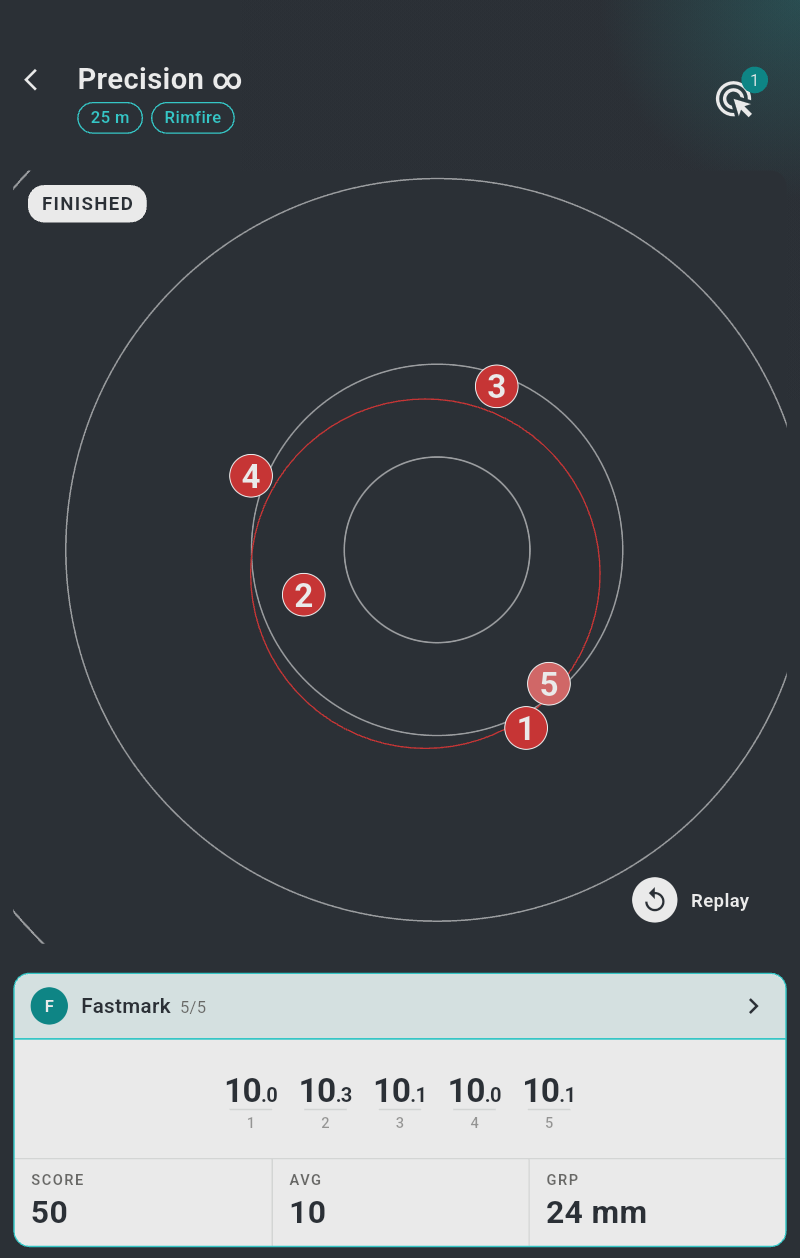
- the head: the shooter's initial and name with the shots fired over the shots planned (3/5); when a malfunction may be declared, a hand icon (§7.9); a chevron opens the hits list (§7.6);
- the shot strip: the individual shot scores side by side in shooting order, each over its shot number — a · stands for a shot not yet fired, and a hand-edited score is shown in gold (§7.8). The strip scrolls sideways and keeps the latest shot centred;
- the figures: "SCORE" (the running total, with the X count on Benchrest faces), "AVG" (the average per shot) and "GRP" (the group size — the mean radius in millimeters, §7.7).
Timing. In a timed precision series shorter than 30 seconds, a slim series-time gauge above the strip marks when each shot fell: one segment per shot, proportional to its split time, with the total time in seconds beside it. Once the series is over, the unused remainder of the bar is light if every shot came in time, orange otherwise:

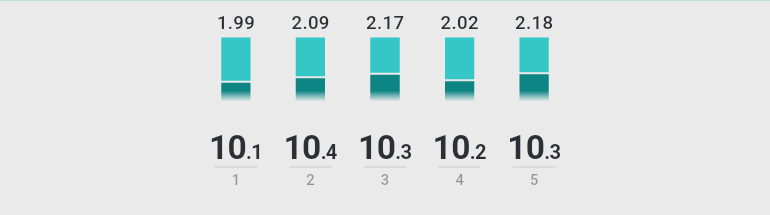
In rapid fire, each shot carries its reaction time above its score (1.99 — in seconds from the start of its exposure) over a small column filled up to that time. The column shows only the second half of the exposure, where shots land, so the margin left reads at a glance (here a 3/7 series); it turns orange for a miss:
Several shooters — the overview. When a session has two or more shooters, the session owner's series screen offers an "Overview" button ("{} shooters") above the card. The overview shows the series progress (one dot per planned shot and the action button), an "Order by rank" switch, and a compact card per shooter: a rank disc (a crown for the leader), the name, the shots fired, the total, a thumbnail of the face with the shooter's hits and the shot strip. Cards reorder live as ranks change; equal totals share a rank, with the X count as the tie-breaker on Benchrest faces. Tap a card to come back to that shooter's full view.
Session totals (match sessions): each shooter's card on the session page shows the running total — the sum of all scored series, excluding sighting series, with malfunction re-shoots paired per the rules in §7.9.
Result cards and session cards carry the team name, which is normally the shooter's display name recorded when the session was created.
7.6 The hits list¶
Tap the chevron on a result card to open the hits list — every shot of the series in detail, one row per shot, under the series title and the shooter's name:
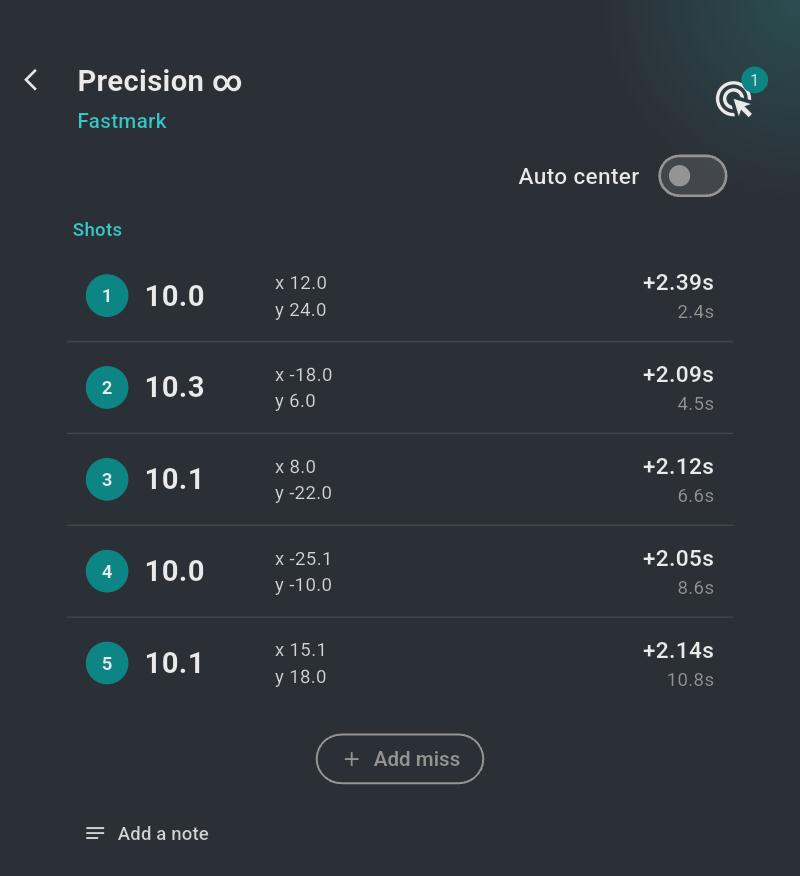
- Each row of the "Shots" list carries the shot's number in a disc (a dash for
a shot that does not count), its score, the impact coordinates in
millimeters (
x/yfrom the center — or a "Missing hit" chip for a miss without position), the split time from the previous shot (+1.23s) over the time from series start (12.3s), and — in multi-target sessions — which target it hit. - The "Auto center" switch in the title bar re-scores the whole series as if the group were centered on the ten: every shot's score is recomputed around the group's center. Use it to judge pure grouping while ignoring a sight-setting error; switch it off to return to the real scores.
- Below the list sit the "Add miss" button (§7.3) and the "Add a note" link, which opens the series "Notes" field.
The hits list is also where a score is corrected by hand (§7.8).
7.7 Group statistics¶
Computed live from the valid shots (two shots minimum):
| Statistic | Meaning | Where |
|---|---|---|
Mean radius (GRP) |
Average distance of the shots from the group's center, in mm — the standard group-size measure | Result card; red circle on the face |
| Maximal spread | The distance between the two farthest shots | Red frame on the face |
Average (AVG) |
Total ÷ valid shots | Result card |
The circle and frame overlays are toggled in Settings → Indicators and are not drawn on the Benchrest faces (grid targets have no single group).
7.8 Correcting a score by hand¶
Scores are computed, but the range officer has the last word. In the hits list (§7.6), long-press a shot to open the "Update score" dialog, captioned "Shot 3 · computed 9.7":
- type the "New value" (decimals allowed, with a point or a comma) and confirm with "OK" — the shot now counts with that value. It is shown in gold on the result card, and the hits list shows the computed score struck through next to it;
- the reset icon in the field recomputes the score from the impact position, removing the mark.
Hand-edited scores enter totals and statistics like any other.
7.9 Malfunctions (ISSF procedure)¶
For ISSF-compliant series (official templates), the app implements the malfunction procedure:
- After the series ends, tap the hand icon in the affected shooter's result card head. The "Malfunction" panel asks for the number of "Valid shots before malfunction" — set it with the − / + stepper and confirm with "OK". ("Cancel malfunction" withdraws a declaration.)
- The action button turns into "Reshoot": tapping it creates a "Malfunctions" series — an identical series for the affected shooter(s), inserted right after the original — and starts it.
- Scoring of the pair follows the discipline (ISSF rules 8.9.4.5 – 8.9.4.6), with N the series' shot count and the declared valid shots always kept:
- Sport events — completion: the shots fired before the malfunction stand, and the first shots of the re-shoot supply the remainder up to N.
- Rapid-fire events — lowest per target: each shot position is one target; for every position, the lower of the original and the re-shoot shot counts.
- Standard and all other events — pooled lowest: the kept shots and all re-shoot shots are pooled and the N lowest-scoring count.
Whatever the rule, a malfunction can never gain points.
The session total handles all of this automatically. The re-shoot series is
labelled "Malfunctions" everywhere it appears, only one re-shoot is possible
per series, and its score cell shows the correction it contributes (a +
value) rather than a stand-alone score — the original and the re-shoot lines add
up to the combined result, never counted twice.
Your progress over weeks and months has a chapter of its own: chapter 8, Statistics.